no healthy upstream
BinhPhuoc.WapGem.Com
Tổng hợp game mobile cho mọi hệ điều hành
Hướng dẫn gỡ bỏ Creative Cloud trong Photoshop CC - Thủ Thuật - Tin Tức - BinhPhuoc.WapGem.Com
> > >

Hướng dẫn gỡ bỏ Creative Cloud trong Photoshop CC

* Người Đăng : Kero Kenji
* Đăng lúc : 11/05/18
* Chuyên mục : Thủ Thuật - Tin Tức
* Lượt Xem: XtCAT -:- 404
Old school Swatch Watches
0: php_network_getaddresses: getaddrinfo failed: Name or service not known
Advertise Here

404 - Page Not Found - Back Home


Total Visits: 20630374
Visits Today: 285707
This Week: 5581217
This Month: 13776144

This site, is built entirely by using XtGem.

XtGem is a visual mobile site building tool, allowing users to create and maintain highly customizable personal mobile sites completely free of charge - and without a need to know any programming language at all!


Chia sẻ bài viết :f z g+ go


What is Adobe Creative Cloud?


Creative Cloud là một hệ thống đám mây giúp lưu trữ, đồng bộ các dự án, bản vẽ của bạn để có thể sao lưu bất cứ ở đâu, bất cứ khi nào. Nhưng hiện tại để sử dụng công cụ này bạn phải trả một mức phí hằng tháng khá cao, vì thế đối với người dùng không chuyên thì Creative Cloud thật sự không cần thiết.


How to Uninstall Adobe Creative Cloud Apps?


1. Tải file : Creative Cloud Uninstaller


Use Sever 1: 


Link: Google Driver | Fshare | 4share


Use Sever 2: 


Link: Google Driver | Fshare | 4share


Use Sever 3:


Link:  Google Driver | Fshare | 4share


2. Giải nén file. (unzip file)


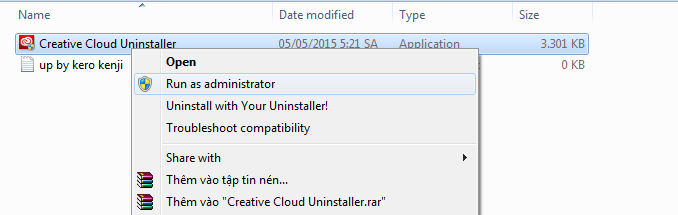
3. Chạy Chạy file Creative Cloud Uninstaller.exe với quyền Admin 0


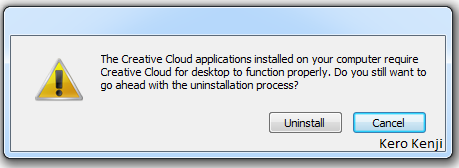
4. Bấm Uninstall 0


5. Gỡ cài đặt xong (done)



Game Hot Nhất Trong Tuần
* Tags :

Thủ, Thuật, -, Tin, Tức, Hướng, dẫn, gỡ, bỏ, Creative, Cloud, trong, Photoshop, CC, Blog

Thủ, Thuật, -, Tin, Tức, Hướng, dẫn, gỡ, bỏ, Creative, Cloud, trong, Photoshop, CC, Blog
Liên Kết Wap Bạn Bè
TextLink : TinNhanNhanh [ Đặt Liên Kết ]